 St0pp3r's Blog
Implementing an Alert Suppression Function in Microsoft Sentinel
Implementing an Alert Suppression Function in Microsoft Sentinel
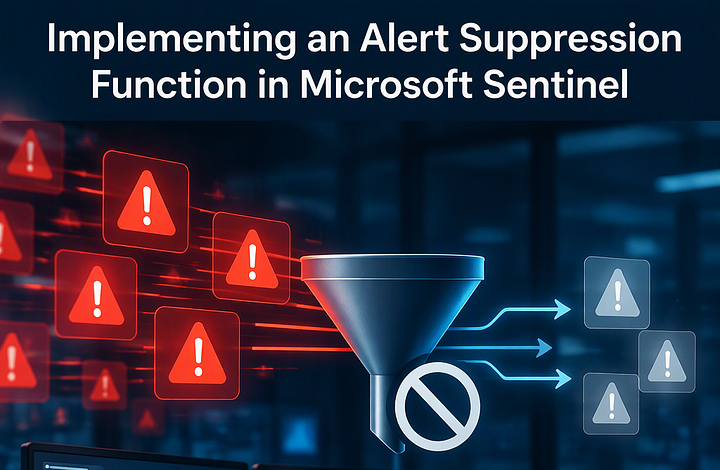
Alert suppression is a feature used in SIEM platforms to prevent repetitive or duplicate alerts from being generated within a specified time window when they share common fields or match predefined criteria. Instead of generating multiple alerts for the same or similar activity, the system suppresses subsequent matching alerts, reducing alert noise and allowing security analysts to focus on new security events rather than repeatedly investigating the same activity.
Alert suppression is particularly useful for network-based detections that frequently repeat, or when certain behaviours within an environment continuously trigger security IDS or network scan rules, generating the same alerts over and over again.
Consider the following events for example:
| Timestamp | SourceIP | Threat | SignatureName |
|---|---|---|---|
| 2026-11-18 10:05:22 | 192.168.10.25 | Malware | Trojan.Generic |
| 2026-11-18 10:36:05 | 192.168.10.25 | Malware | Trojan.Generic |
| 2026-11-18 10:58:43 | 192.168.10.25 | CredentialTheft | Mimikatz.Detect |
In this scenario, we want to generate an alert for the first occurrence and suppress subsequent duplicate alerts originating from the same SourceIP or the same SourceIP and SignatureName.
Alert Suppression in Sentinel
Different SIEM vendors implement alert suppression in different ways. In Microsoft Sentinel, the alert suppression option stops a rule from executing without providing the ability to define specific entities (such as IP addresses, users, or hostnames) for suppression.
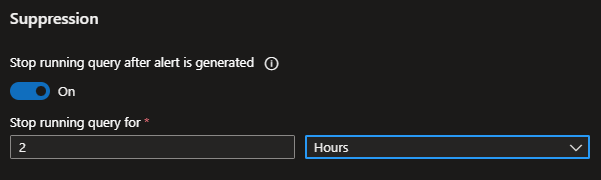
As a result, all future alerts generated by that analytics rule are suppressed during the configured period, regardless of whether they originate from the same IP address or an entirely different source. This means that potentially unrelated security threats may go undetected while suppression is active. Clearly, this is not a behaviour we want for our detection rules.
Alert Grouping in Sentinel
In Sentinel, alerts can be configured to generate or contribute to incidents, which are ultimately the trigger for investigations by SOC analysts. Therefore, an alternative approach to reducing the number of incidents generated is alert grouping, which allows newly generated alerts to be aggregated into a single incident based on matching entities (such as IP addresses, users, or hosts) within a predefined time window.
However, this approach also has limitations. For alert grouping to work, the existing incident must remain open throughout the grouping period or be reopened to allow subsequent alerts to be associated with it. For many SOCs, this is not a viable option, as keeping incidents open or reopening them may conflict with established SLAs, incident-handling procedures, and operational requirements.
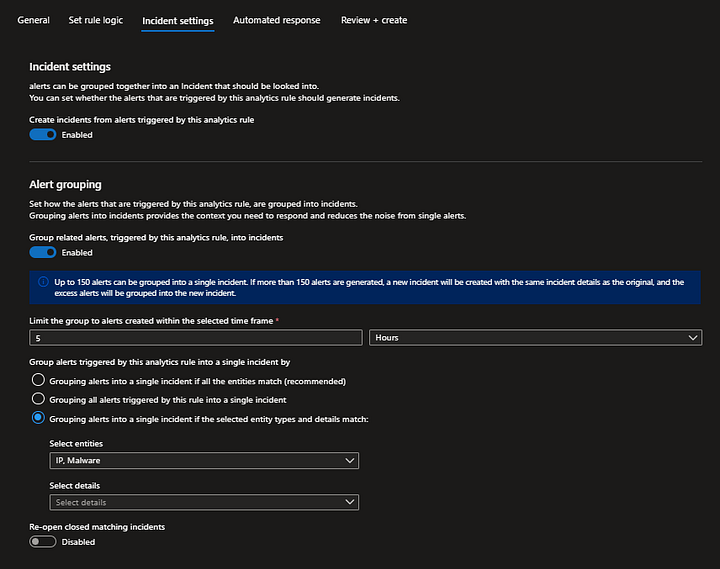
Instead, what we are looking for is a solution that allows alert suppression to be configured based on clearly defined entities, ensuring that only subsequent alerts associated with the same entity are suppressed, while alerts originating from different entities continue to be generated and processed normally.
Sentinel’s Alert Anatomy
Before diving into the proposed solution, let’s take a step back and explore the alert schema in Microsoft Sentinel to understand how alerts are structured and how we can leverage the information in that schema to implement our suppression Function.
Alerts in Sentinel are stored under the SecurityAlert table. Within the alert schema, the ExtendedProperties field contains a Query property, which holds a Base64-encoded, Zlib-compressed representation of the log entries returned by the analytic query of the triggering rule. These entries correspond to the records that triggered the alert and can provide uus with the information we need to implement the entity-based alert suppression function.
Example:

// might contain sensitive data
let alertedEvent = datatable(compressedRec: string)
['eAENiz0LwkAMhv9L5nJ4BUW7KohDQeht4hDOVxutVwgpgqX/vVmfj5m6cdKMy5Uaioc6xN0+xE2ot1RR6hVs1Nyo5eHHCmdHxQPFhIfU42l0r6iTV2GbXHuZdHxzCWcUqGQfWvnKh+0fTjBkH5YVFdUlfQ==']
| extend raw = todynamic(zlib_decompress_from_base64_string(compressedRec)) | evaluate bag_unpack(raw) | project-away compressedRec;
alertedEvent
We can leverage KQL to decode the ExtendedProperties.Query field and reconstruct the original log entries. This involves extracting the Base64-encoded value from the field, decoding it, and then decompressing the resulting data using Zlib to restore the original log entries.
To test this against your own alerts, run the following query:
SecurityAlert
| where Status == "New"
| where ProductName == "Azure Sentinel"
| where ProductComponentName == "Scheduled Alerts"
| extend Query = parse_json(ExtendedProperties).Query
| extend b64 = extract(@".*?\[\'([A-Za-z0-9+/=]+)\'\].*", 1, tostring(Query))
| extend raw = todynamic(zlib_decompress_from_base64_string(b64))
| project-keep AlertName, raw
| evaluate bag_unpack(raw, columnsConflict = "replace_source")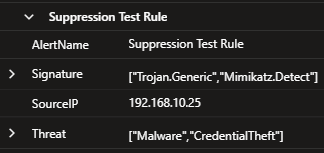
This is great! We can now access the original log entries that triggered an alert for our analytics rule, allowing us to extract and use the associated entities.
Alert Suppression Function
Now that we can access and inspect previously generated alerts directly through KQL, the next step is to stitch everything together into a reusable Sentinel Function. This will allow us to apply our suppression logic consistently across multiple analytics rules while keeping the implementation flexible through parameters that can be tailored to each rule’s specific requirements. Additionally, centralizing the logic in a function makes it much easier to maintain and evolve. Any improvements, optimizations, or future changes to the suppression mechanism can be implemented once and propagated across all consuming rules, without having to modify each individual query.
For the sake of simplicity, we’ll start with a suppression function that accepts a single suppression field.
let SuppressAlerts = (
  T: (*),
  SuppressionAlertName: string,
  SuppressionWindow: timespan,
  SuppressionField: string
  ) {
  let ExistingAlerts = SecurityAlert
    | where TimeGenerated > ago(SuppressionWindow)
    | where Status == "New"
    | where AlertName == SuppressionAlertName
    | extend Query = parse_json(ExtendedProperties).Query
    | extend b64 = extract(@".*?\[\'([A-Za-z0-9+/=]+)\'\].*", 1, tostring(Query))
    | extend raw = todynamic(zlib_decompress_from_base64_string(b64))
    | project-keep AlertName, raw
    | evaluate bag_unpack(raw, columnsConflict="replace_source")
    | extend SecurityAlertSuppressionFieldValue = column_ifexists(SuppressionField, "SecurityAlertSuppressionFieldValue")
    | extend SecurityAlertSuppressionSuppressionFieldValueDynamic = parse_json(SecurityAlertSuppressionFieldValue)
    | extend SecurityAlertSuppressionFieldColumn = iff(
        gettype(SecurityAlertSuppressionSuppressionFieldValueDynamic) == "array",
        tostring(array_sort_asc(SecurityAlertSuppressionSuppressionFieldValueDynamic)),
        tostring(SecurityAlertSuppressionFieldValue)
    );
  T
  | extend TableSuppressionFieldValue = column_ifexists(SuppressionField, "SecurityAlertSuppressionFieldValue")
  | extend TableSuppressionFieldValueDynamic = parse_json(TableSuppressionFieldValue)
  | extend TableSuppressionFieldColumn = iff(
      gettype(TableSuppressionFieldValueDynamic) == "array",
      tostring(array_sort_asc(TableSuppressionFieldValueDynamic)),
      tostring(TableSuppressionFieldValue)
  )
  | join kind=leftanti ExistingAlerts on $left.TableSuppressionFieldColumn == $right.SecurityAlertSuppressionFieldColumn
  | project-away TableSuppressionFieldValue, TableSuppressionFieldValueDynamic, TableSuppressionFieldColumn
};
SuppressAlerts(T=T, SuppressionAlertName=SuppressionAlertName, SuppressionWindow=SuppressionWindow, SuppressionField=SuppressionField)
We’ll break down the query and provide some explanation on it.
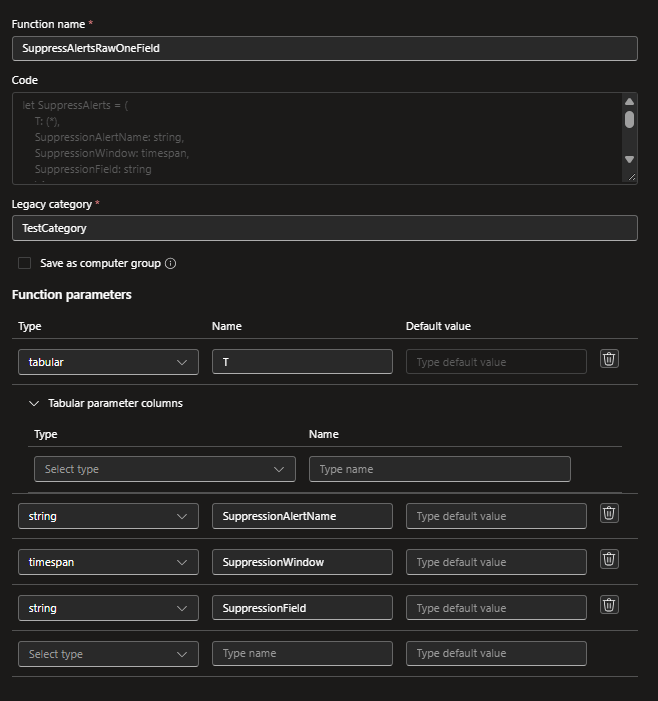
The function takes four input parameters that determine how suppression will be applied. T represents the results table of the calling analytics rule query, SuppressionAlertName identifies the alert name used to retrieve previously generated alerts, SuppressionWindow defines the lookback period during which existing alerts are considered, and SuppressionField specifies the entity field used to determine whether a new result should be suppressed.
let SuppressAlerts = (
  T: (*),
  SuppressionAlertName: string,
  SuppressionWindow: timespan,
  SuppressionField: string
  )
The function first queries the SecurityAlert table to retrieve existing alerts matching the specified alert name, with a status of New, generated within the configured suppression window.
let ExistingAlerts = SecurityAlert
    | where TimeGenerated > ago(SuppressionWindow)
    | where Status == "New"
    | where AlertName == SuppressionAlertName
For each matching alert, the function extracts the Query property from the ExtendedProperties field. It then uses a regular expression to retrieve the Base64-encoded payload and decompresses it using zlib_decompress_from_base64_string(). This reconstructs the original log entries that triggered the alert, making their associated entities accessible for further processing.
| extend Query = parse_json(ExtendedProperties).Query
| extend b64 = extract(@".*?\[\'([A-Za-z0-9+/=]+)\'\].*", 1, tostring(Query))
| extend raw = todynamic(zlib_decompress_from_base64_string(b64))
The decompressed payload is a dynamic object containing the original query results. Using bag_unpack(), the function expands this object into individual columns, allowing us to access the original fields. It then dynamically extracts the field specified through the SuppressionField parameter using column_ifexists() which acts as a fail safe to prevent the analytics rule query from failing if for any reason the decoding fails.
| project-keep AlertName, raw
| evaluate bag_unpack(raw, columnsConflict="replace_source")
| extend SecurityAlertSuppressionFieldValue = column_ifexists(SuppressionField, "SecurityAlertSuppressionFieldValue")
Since the suppression field may contain either a single value or an array of values, we need to normalize its representation before performing the comparison. The function first attempts to parse the value as JSON and checks whether it represents an array. If it does, the elements are sorted and converted into a string. Otherwise, the original value is converted directly into a string. This ensures that arrays containing identical elements are treated as equivalent, regardless of the order in which those elements appear. Therefore, an existing alert containing an array of two IP addresses will not suppress a subsequent alert containing an array of three IP addresses, even if the latter includes both previously observed IP addresses.
| extend SecurityAlertSuppressionSuppressionFieldValueDynamic = parse_json(SecurityAlertSuppressionFieldValue)
| extend SecurityAlertSuppressionFieldColumn = iff(
    gettype(SecurityAlertSuppressionSuppressionFieldValueDynamic) == "array",
    tostring(array_sort_asc(SecurityAlertSuppressionSuppressionFieldValueDynamic)),
    tostring(SecurityAlertSuppressionFieldValue)
);
The function then uses a leftanti join to compare the normalized suppression field values from the current query results against those extracted from previously generated alerts. The leftanti join returns only records from the current results that do not have a matching entity in the reference dataset. Consequently, records associated with entities that have already triggered an alert within the configured suppression window are excluded, while records associated with different entities remain eligible to generate new alerts.
| join kind=leftanti ExistingAlerts
    on $left.TableSuppressionFieldColumn ==
       $right.SecurityAlertSuppressionFieldColumn
Finally, the last line of the query invokes the function logic.
SuppressAlerts(T=T, SuppressionAlertName=SuppressionAlertName, SuppressionWindow=SuppressionWindow, SuppressionField=SuppressionField)To save the function, copy the query above in the KQL editor and click on Save as function.
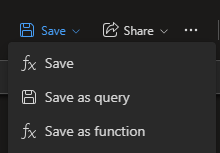
In the side panel that opens, make sure to populate the function parameters with the correct values and data types.
Using the Function in Log Analytic Rule Queries
Once saved, the function can be reused across multiple analytics rules without having to duplicate the suppression logic. To test this, we’ll use a sample dataset that simulates security events and apply our newly created function to its results.
let SecurityEvents = datatable(
    SourceIP:string,
    Threat:string,
    Signature: string,
)
[
    "192.168.10.25", "Malware", "Trojan.Generic",
    "192.168.10.25", "Malware", "Trojan.Generic",
    "192.168.10.25", "CredentialTheft", "Mimikatz.Detect"
];
let frequency = 1h;
let suppression_window = 1h;
SecurityEvents
| extend TimeGenerated = now() + (rand(300) * 1s)
| where TimeGenerated > ago(frequency)
| summarize
    minTimeGenerated = min(TimeGenerated),
    maxTimeGenerated = max(TimeGenerated),
    Threat = make_set(Threat),
    Signature = make_set(Signature)
by SourceIP
| invoke SuppressAlertsRawOneField(SuppressionAlertName="Suppression Test Rule", SuppressionWindow=suppression_window, SuppressionField="SourceIP")
To use the function correctly within our analytics rules, we need to pay particular attention to the rule’s execution frequency and lookback times.
Since our suppression function queries the SecurityAlert table to identify previously generated alerts, the rule’s lookback period must be aligned with the suppression window configured in the function. For example, if we want to suppress alerts for one hour, the lookback period specified in the analytics rule settings should also be set to one hour.
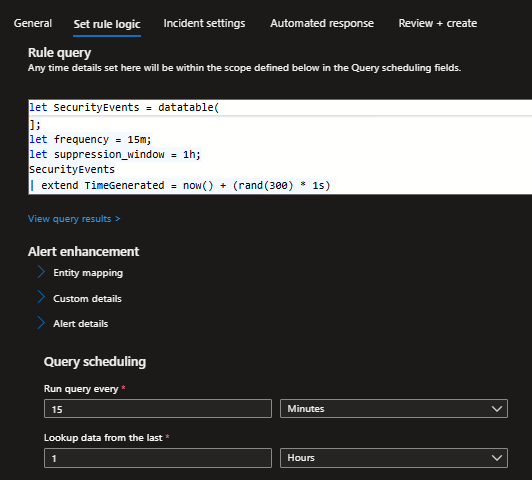
Now that we are retrieving data for the entire one-hour lookback period, we also need to account for the analytics rule’s execution frequency within the query itself. We must filter the results to include only events that occurred within the rule’s execution interval. For example, if the rule is configured to run every 15 minutes, we need to add a time filter to the query that returns only events from the last 15 minutes. This ensures that we can use the extended one-hour lookback period to identify previously generated alerts for suppression without repeatedly processing the same events across consecutive rule executions.
| where TimeGenerated > ago(frequency)With these settings, we can use the suppression function as intended, with the extended lookback period needed to identify previously generated alerts while ensuring that only newly occurring events are processed during each rule execution.
Indeed after letting our test analytic’s rule run for a few hours we can see that we are generating incidents every one hour as intended with our suppresion function settings.
Limitations and Considerations
Some limitations and considerations worth taking into account as these may affect the reliability of the suppression function and should be taken into consideration if you decide to adopt this method:
- The function relies on the
ExtendedProperties.Queryfield, which is subject to a 10 KB size limitation (source). If the compressed query payload exceeds this limit, a warning is typically displayed, preventing the function from extracting the entities required for suppression. Analytics rules producing particularly verbose or large result sets may therefore be unsuitable for this approach. - An alternative implementation would be to leverage the Alert Entities or Custom Details available in Sentinel rather than relying on the original query output. This would allow us to perform suppression field matching using the entity information or explicitly defined custom details associated with each alert, potentially avoiding the dependency on the compressed query payload. It should be noted though that this method also comes with its own limitations (source).
- Another important consideration is the delay between the execution of the analytics rule query and the actual generation and ingestion of the corresponding alert into the
SecurityAlerttable. If the rule execution frequency is too short or the suppression window is too small, a subsequent execution may occur before the previously generated alert becomes available inSecurityAlert. As a result, the suppression function may fail to identify an existing alert, allowing duplicate alerts to be generated. Based on my tests a frequency of 15m and a suppression windows of 1h should be the minimum reliable values for this method to work effectively but these values may vary per environment. - Finally, an additional point worth noting is that the function can be extended to use multiple entity fields for suppression, rather than relying on a single field. This would allow suppression to be based on a combination of entities, such as a source IP address and signature, providing greater flexibility over which alerts are suppressed.
Closing Thoughts
As detection engineers, we need to be creative in finding ways to work around the limitations of the tools we use. The approach in this blog post demonstrates how we can leverage the capabilities provided by SIEM query language and correlation engine to implement an entity-based suppression method without compromising the execution of our analytics rules.
Of course, as most solutions this one also comes with its own limitations and trade-offs, and it is important to understand them before adopting it in production. Nevertheless, it provides a practical alternative and a good example of how a little creativity can help bridge gaps in native SIEM capabilities.
If you faced the same issue in Microsoft Sentinel I would be more than intrested to discussing the solution you came up with.