 St0pp3r's Blog
Detecting GitHound Enumeration via the GitHub API
Detecting GitHound Enumeration via the GitHub API
For many organizations, GitHub Enterprise serves as a central platform for software development, collaboration, and source code management. This makes it an increasingly valuable target for attackers seeking access to source code, sensitive information, credentials, and development infrastructure.
Recent incidents demonstrate an increasing preference among attackers for targeting GitHub environments. In March 2026, the Trivy supply-chain attack involved stolen credentials being used to publish malicious releases and tamper with GitHub Actions. The compromise subsequently extended to Checkmarx’s GitHub environment, where attackers gained unauthorized repository access and distributed malicious code through developer tools and CI/CD. In May 2026, GitHub itself disclosed that an employee device had been compromised through a malicious VS Code extension, resulting in the exfiltration of internal repositories. In May 2026, a reported exposure of sensitive CISA information through a public GitHub repository highlighted how misconfigured access and unintended data disclosure can expose sensitive information. These incidents highlight the growing importance of protecting and monitoring code repositories. Tools such as GitHound, a BloodHound OpenGraph collector for GitHub released by SpecterOps earlier in 2026, can help defenders map a GitHub organization’s environment by identifying relationships between users, teams, repositories, and permissions. This allows them to understand access relationships, identify excessive privileges, and uncover potential attack paths. However, the same capabilities can also be leveraged by adversaries to map an organization’s GitHub environment, discover accessible resources, and identify opportunities for further access.
With this in mind, I took a closer look at GitHub Enterprise audit logs and whether they can be used to detect enumeration through the GitHub API.
Running GitHound Against a GitHub Organization
GitHound interacts directly with the GitHub API to collect information about an organization’s users, teams, repositories, and permissions. To do so, it requires a GitHub access token with the appropriate permissions to access the resources being queried. The scope of the collected data therefore depends on the token’s privileges.
Step 1: Create a GitHub Personal Access Token
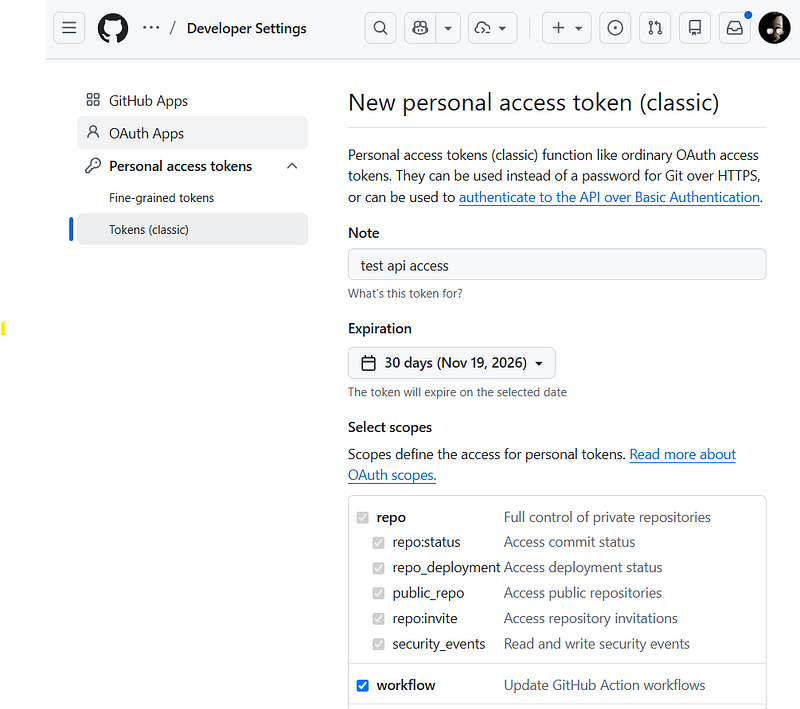
To authenticate GitHound, create a personal access token (PAT) on GitHub.
- Navigate to GitHub’s personal access token settings for your account.
- Select Tokens, then click Generate new token.
- Provide a descriptive name and set an appropriate expiration date.
- Configure the repository access and permissions required for the resources you intend to collect. Use the GitHub documentation to understand the available permissions.
- Generate the token and copy it immediately.
Step 2: Run GitHound Against the Organization
Download the tool from the official SpecterOps GitHound repository.
Open a PowerShell session and run the following commands.
1. Load the collector
. ./githound.ps1 )
)
GitHound module loading
2. Create a session with your Personal Access Token
$session = New-GitHubSession -OrganizationName "<YourOrgName>" -Token "<personal_access_token>" )
)
GitHound session variable creation
3. Run the collection script
Invoke-GitHound -Session $sessionAlternatively, collect all available data:
Invoke-GitHound -Session $session -CollectAll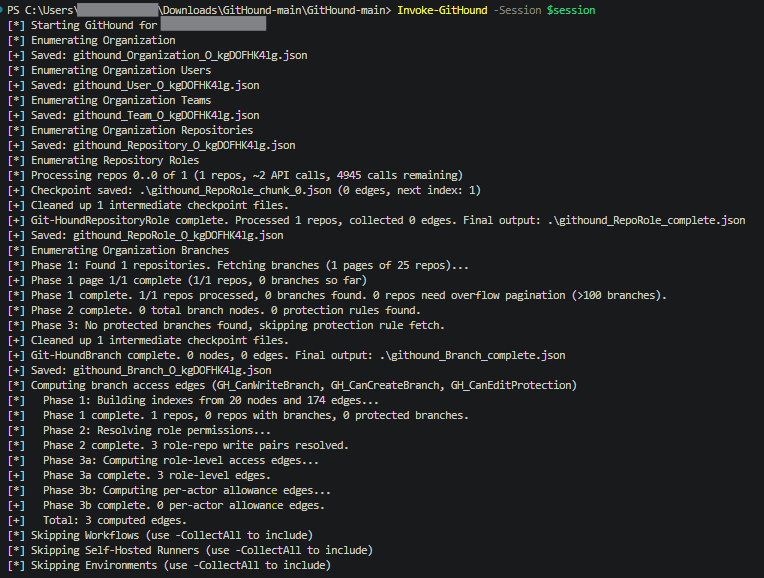 )
)
GitHound execution
GitHub Logging Configuration
As GitHound makes API requests to enumerate these resources, its activity will be visible in GitHub audit logs, providing an opportunity for defenders to investigate and detect potentially suspicious patterns of API usage. Before building a detection for GitHub API enumeration, it is important to ensure that the relevant audit events are being collected.
Sign in to GitHub with an enterprise owner account and navigate to Settings.
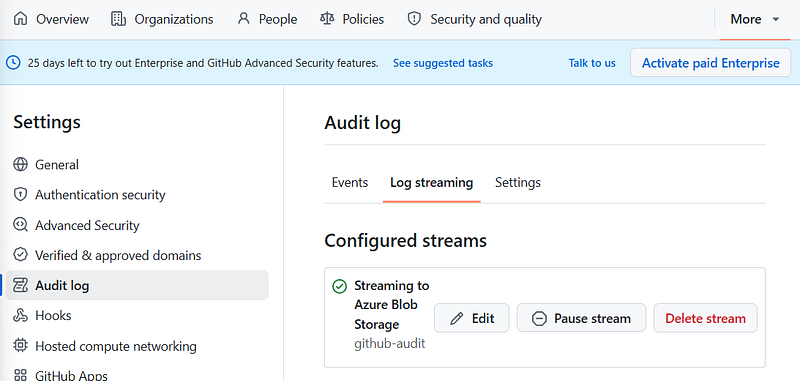
Open Audit log and select Log streaming. For our tests, we selected streaming to Azure Blob Storage to ingest the logs into Microsoft Sentinel via the GitHub data connector from Microsoft’s Content Hub.
Create a new audit log stream and configure the destination where the logs will be sent.
 )
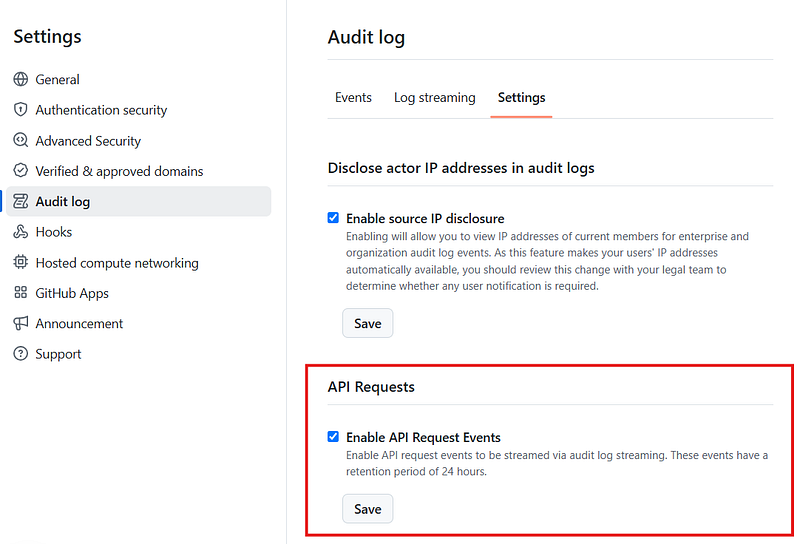
)In the Settings tab, enable Enable API Request Events so that API activity is captured alongside other audit events.
 )
)Save the configuration and verify that events are arriving at the configured destination.
For detailed instructions, refer to GitHub’s official documentation: Streaming the audit log for your enterprise.
Building the Detection
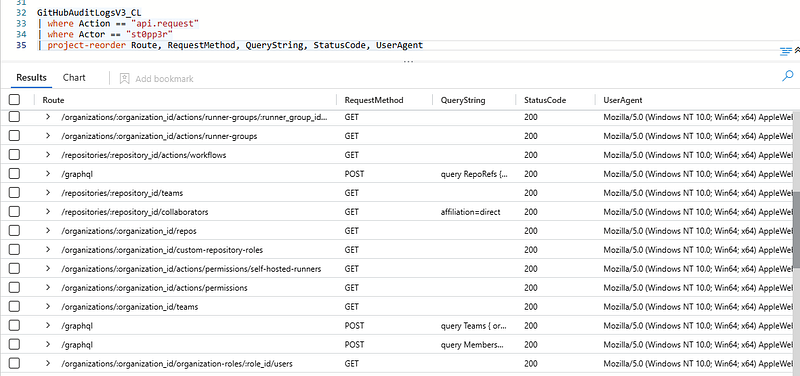
GitHound’s API activity is visible in the GitHub audit logs, providing an opportunity to detect enumeration through Microsoft Sentinel.
 )
)
GitHound enumeration activity
The query focuses on API routes commonly used to retrieve organizational information, including repositories, teams, permissions, and GitHub Actions configuration. It counts the distinct routes and URL paths accessed by an actor and compares these counts against predefined thresholds to identify potential enumeration activity.
While this behavior is consistent with GitHound, the detection identifies an enumeration pattern rather than this specific tool.
Microsoft Sentinel KQL Query
let route_threshold = 10;
let url_path_threshold = 20;
let routes_of_interest = dynamic([
@'/graphql',
@'/organizations/:organization_id/organization-roles/:role_id/teams',
@'/organizations/:organization_id/actions/secrets',
@'/organizations/:organization_id/custom-repository-roles',
@'/organizations/:organization_id/repos',
@'/organizations/:organization_id/secret-scanning/alerts',
@'/organizations/:organization_id/organization-roles/:role_id/users',
@'/organizations/:organization_id/actions/permissions/self-hosted-runners',
@'/organizations/:organization_id/actions/permissions',
@'/organizations/:organization_id/actions/variables',
@'/organizations/:organization_id',
@'/organizations/:organization_id/actions/permissions/workflow',
@'/organizations/:organization_id/organization-roles',
@'/organizations/:organization_id/teams'
]);
GitHubAuditLogsV3_CL
| where Action == "api.request"
| project-reorder UrlPath, Route, RequestMethod, QueryString, StatusCode, UserAgent
| where Route in~ (routes_of_interest)
| summarize
c = count(),
RequestMethod = make_set(RequestMethod),
StatusCode = make_set(StatusCode),
Route = make_set(Route),
UrlPath = make_set(UrlPath),
UserAgent = make_set(UserAgent),
User = make_set(User),
OperationType = make_set(OperationType),
Org = make_set(Org),
OrgId = make_set(OrgId),
ActorId = make_set(ActorId),
ActorIsBot = make_set(ActorIsBot),
ProgrammaticAccessType = make_set(ProgrammaticAccessType),
TokenScopes = make_set(TokenScopes),
Type = make_set(Type),
Action = make_set(Action),
Business = make_set(Business)
by Actor, TokenId
| extend RouteCount = array_length(Route)
| extend UrlPathCount = array_length(UrlPath)
| where RouteCount > route_threshold
or UrlPathCount > url_path_threshold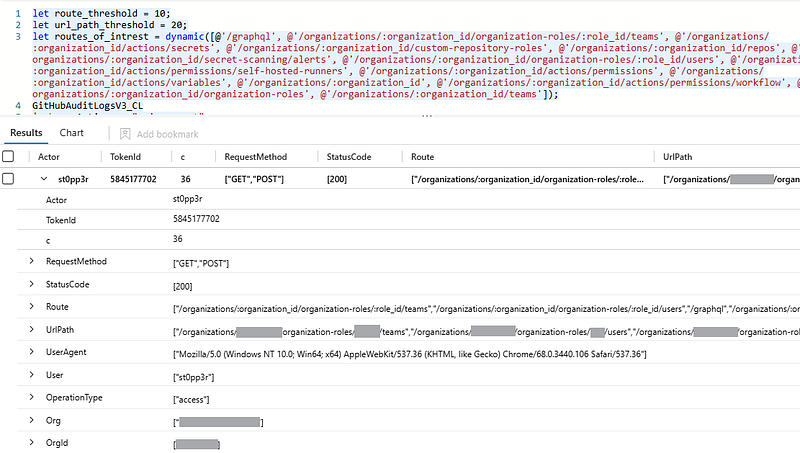 )
)
GitHub API enumeration query results
Closing Thoughts
GitHub API enumeration can provide attackers with valuable insight into an organization’s repositories, permissions, and development workflows, making API monitoring essential for protecting development environments.
In this blog post, we demonstrated how GitHound’s activity can be observed in GitHub audit logs and how to detect the API enumeration pattern. By enabling API request logging and implementing this or similar detections, defenders can improve visibility across their GitHub Enterprise environment and identify suspicious activity at an early stage.